2020年4月8日水曜日

Sonatype Nexus IQ v89がリリースされました

https://help.sonatype.com/iqserver/product-information/release-notes#ReleaseNotes-Release89(April2020)

この間(先週?)v88が出たと思ったら、もうv89です。

気になる変更点:

PDFレポートが変わりました。

見た目がずいぶんシンプルになりました。そのためか、パフォーマンスも良くなったと書いてあります。
PDF作成用のライブラリが更新されたということは、今後サポートされるJavaバージョンも最新のものがサポートされるかもしれません。

RとRustアプリケーション分析

どっちの言語も使わないので、個人的には関係ないですが、使う方にはもちろん有用だと思います。

ちなみにv88では、Swift/Object-CとCondaが追加されていました。

2020年3月18日水曜日

Sonatype Nexus IQ v87がリリースされました

https://help.sonatype.com/display/NXIQ/2020+Release+Notes#id-2020ReleaseNotes-Release87(March2020)

注目の追加点は、C/C++, PHP, Rubyがサポートされた点です。
PHPはまだまだ使用されている開発者も多いと思いますので、有用な追加点ではないでしょうか。
https://help.sonatype.com/iqserver/analysis/php-application-analysis によると、composer.lockファイルを基に脆弱性の検査が行われるようです。


あと、記載されていないのですが、内蔵のH2データベースを使用されている場合は、パフォーマンスの向上が見込めるかもしれません。

2020年2月27日木曜日

Sonatype Nexus IQ v85がリリースされました

この間v84がリリースされたばかりですが、もうv85がリリースされました。
https://help.sonatype.com/iqserver/product-information/release-notes/2020-release-notes

個人的に、注目の追加点はふたつです。

New Component Category Policy Condition

コンポーネントカテゴリーとは、https://help.sonatype.com/iqserver/managing/policy-management/understanding-the-parts-of-a-policyを読むと、一行以下の文章があります…
Verify if the component category is or is not a specified category.  If you've used the Component Information Panel, the Category is specified there.  If a parent category is selected, a match will occur on any child category as well.
要は、CONSTRAINTSのコンディションに"Component Category"が追加されました。
で、色々カテゴリーが選べるのですが、どのカテゴリーを選べばいいかは、Component Information Panel (CIP)を見てください、ってことですね。

New Component Claim REST API

https://help.sonatype.com/iqserver/automating/rest-apis/component-claim-rest-api---v2
https://help.sonatype.com/iqserver/reporting/application-composition-report/component-identification#ComponentIdentification-ClaimingaComponent
"Claim"とは、どういうことだと思った方は、二つ目のリンクにちょっと説明があります。
Similarマッチの時に、どのコンポーネントかを指定する(クレイムする)って事ですね。
これが、APIでできるようになったと。


Helmサポート

Sonatype Nexus Repository Manager (NXRM3) 3.21.1からHelmフォーマットがサポートされました。

Sonatype公式の簡単な動作紹介ビデオ:https://play.vidyard.com/n3z5jJPLnUav3oiz8pkCbh.jpg
Sonatypeドキュメント:https://help.sonatype.com/repomanager3/formats/helm-repositories

Helmとは:https://helm.sh/
Kubernetesは今注目のテクノロージーなので、ぜひ試してみてください。

2020年2月20日木曜日

Sonatype Nexus Repository Manager (NXRM3) 3.21.1がリリースされました

https://help.sonatype.com/repomanager3/release-notes/2020-release-notes#id-2020ReleaseNotes-RepositoryManager3.21.0

主な変更点

公式に、p2とHelmフォーマットがサポートされました。
これでコミュニティのプラグインをいちいちインストール必要がなくなりましたね。

あとNuGet V3がサポートされました。
V2はパフォーマンスに問題があったそうなので、V3を使用することによってNuGetレポジトリのパフォーマンス向上に期待できそうです。

2020年2月18日火曜日

Sonatype Nexus IQ v84がリリースされました

https://help.sonatype.com/iqserver/product-information/release-notes#ReleaseNotes-Release84(February2020)

主な変更点

HTTPプロキシの設定がconfig.ymlからデータベース内(H2かPostgreSQL)に変更されました。
アップグレード時に自動で移行される模様です。(アップグレード後はconfig.ymlのプロキシ設定は無視される)
Eメールの設定も同様に、config.ymlからデータベース内になりました(v83から)

あと気になるのは、NPMの自動プルリクエスト作成に対応。
https://help.sonatype.com/integrations/nexus-iq-for-scm/automated-pull-requests

2019年3月18日月曜日

Standalone Spark and Spark Thrift Server

Install

su - spark # or spark service user

cd /var/tmp/share
curl --retry 3 -C - -O https://archive.apache.org/dist/spark/spark-2.3.3/spark-2.3.3-bin-hadoop2.7.tgz

mkdir -p /usr/local/apache-spark
tar -xf /var/tmp/share/spark-2.3.3-bin-hadoop2.7.tgz -C /usr/local/apache-spark/

Setup / Start

su - spark # or spark service user

alternatives --display java | grep currently
 link currently points to /usr/lib/jvm/java-1.8.0-openjdk-1.8.0.181-3.b13.el7_5.x86_64/jre/bin/java

export JAVA_HOME=/usr/lib/jvm/java-1.8.0-openjdk-1.8.0.181-3.b13.el7_5.x86_64/jre

/usr/local/apache-spark/spark-2.3.3-bin-hadoop2.7/sbin/start-thriftserver.sh --hiveconf hive.metastore.warehouse.dir=/user/hive/warehouse --hiveconf hive.server2.thrift.port=10000 --executor-memory 2g
starting org.apache.spark.sql.hive.thriftserver.HiveThriftServer2, logging to /usr/local/apache-spark/spark-2.3.3-bin-hadoop2.7/logs/spark-atscale-org.apache.spark.sql.hive.thriftserver.HiveThriftServer2-1-spark.standalone.localdomain.out

TEST:

/usr/local/apache-spark/spark-2.3.3-bin-hadoop2.7/bin/beeline -u "jdbc:hive2://localhost:10000/" -e "CREATE DATABASE IF NOT EXISTS default;SHOW DATABASES;"

NOTE:

To specify an existing derby metastore location:
--hiveconf javax.jdo.option.ConnectionURL=jdbc:derby:/usr/local/apache-spark/metastore_db

2019年3月5日火曜日

Ambari HDP > HDFS NameNodeをスタートできない

Traceback (most recent call last):
  File "/var/lib/ambari-agent/cache/common-services/HDFS/2.1.0.2.0/package/scripts/namenode.py", line 408, in <module>
    NameNode().execute()
  File "/usr/lib/ambari-agent/lib/resource_management/libraries/script/script.py", line 352, in execute
    method(env)
  File "/var/lib/ambari-agent/cache/common-services/HDFS/2.1.0.2.0/package/scripts/namenode.py", line 141, in start
    upgrade_suspended=params.upgrade_suspended, env=env)
  File "/usr/lib/ambari-agent/lib/ambari_commons/os_family_impl.py", line 89, in thunk
    return fn(*args, **kwargs)
  File "/var/lib/ambari-agent/cache/common-services/HDFS/2.1.0.2.0/package/scripts/hdfs_namenode.py", line 173, in namenode
    create_log_dir=True
  File "/var/lib/ambari-agent/cache/common-services/HDFS/2.1.0.2.0/package/scripts/utils.py", line 277, in service
    Execute(daemon_cmd, not_if=process_id_exists_command, environment=hadoop_env_exports)
  File "/usr/lib/ambari-agent/lib/resource_management/core/base.py", line 166, in __init__
    self.env.run()
  File "/usr/lib/ambari-agent/lib/resource_management/core/environment.py", line 160, in run
    self.run_action(resource, action)
  File "/usr/lib/ambari-agent/lib/resource_management/core/environment.py", line 124, in run_action
    provider_action()
  File "/usr/lib/ambari-agent/lib/resource_management/core/providers/system.py", line 263, in action_run
    returns=self.resource.returns)
  File "/usr/lib/ambari-agent/lib/resource_management/core/shell.py", line 72, in inner
    result = function(command, **kwargs)
  File "/usr/lib/ambari-agent/lib/resource_management/core/shell.py", line 102, in checked_call
    tries=tries, try_sleep=try_sleep, timeout_kill_strategy=timeout_kill_strategy, returns=returns)
  File "/usr/lib/ambari-agent/lib/resource_management/core/shell.py", line 150, in _call_wrapper
    result = _call(command, **kwargs_copy)
  File "/usr/lib/ambari-agent/lib/resource_management/core/shell.py", line 314, in _call
    raise ExecutionFailed(err_msg, code, out, err)
resource_management.core.exceptions.ExecutionFailed: Execution of 'ambari-sudo.sh su hdfs -l -s /bin/bash -c 'ulimit -c unlimited ;  /usr/hdp/2.6.5.0-292/hadoop/sbin/hadoop-daemon.sh --config /usr/hdp/2.6.5.0-292/hadoop/conf start namenode'' returned 1. starting namenode, logging to /var/log/hadoop/hdfs/hadoop-hdfs-namenode-node1.sethdesktop.localdomain.out
Error occurred during initialization of VM
GC triggered before VM initialization completed. Try increasing NewSize, current value 192K.

Traceback (most recent call last):
  File "/var/lib/ambari-agent/cache/common-services/HDFS/2.1.0.2.0/package/scripts/namenode.py", line 408, in <module>
    NameNode().execute()
  File "/usr/lib/ambari-agent/lib/resource_management/libraries/script/script.py", line 352, in execute
    method(env)
  File "/var/lib/ambari-agent/cache/common-services/HDFS/2.1.0.2.0/package/scripts/namenode.py", line 141, in start
    upgrade_suspended=params.upgrade_suspended, env=env)
  File "/usr/lib/ambari-agent/lib/ambari_commons/os_family_impl.py", line 89, in thunk
    return fn(*args, **kwargs)
  File "/var/lib/ambari-agent/cache/common-services/HDFS/2.1.0.2.0/package/scripts/hdfs_namenode.py", line 121, in namenode
    format_namenode()
  File "/var/lib/ambari-agent/cache/common-services/HDFS/2.1.0.2.0/package/scripts/hdfs_namenode.py", line 341, in format_namenode
    logoutput=True
  File "/usr/lib/ambari-agent/lib/resource_management/core/base.py", line 166, in __init__
    self.env.run()
  File "/usr/lib/ambari-agent/lib/resource_management/core/environment.py", line 160, in run
    self.run_action(resource, action)
  File "/usr/lib/ambari-agent/lib/resource_management/core/environment.py", line 124, in run_action
    provider_action()
  File "/usr/lib/ambari-agent/lib/resource_management/core/providers/system.py", line 263, in action_run
    returns=self.resource.returns)
  File "/usr/lib/ambari-agent/lib/resource_management/core/shell.py", line 72, in inner
    result = function(command, **kwargs)
  File "/usr/lib/ambari-agent/lib/resource_management/core/shell.py", line 102, in checked_call
    tries=tries, try_sleep=try_sleep, timeout_kill_strategy=timeout_kill_strategy, returns=returns)
  File "/usr/lib/ambari-agent/lib/resource_management/core/shell.py", line 150, in _call_wrapper
    result = _call(command, **kwargs_copy)
  File "/usr/lib/ambari-agent/lib/resource_management/core/shell.py", line 314, in _call
    raise ExecutionFailed(err_msg, code, out, err)
resource_management.core.exceptions.ExecutionFailed: Execution of 'hdfs --config /usr/hdp/2.6.5.0-292/hadoop/conf namenode -format -nonInteractive' returned 1. Error occurred during initialization of VM
GC triggered before VM initialization completed. Try increasing NewSize, current value 192K.


Ambari 2.7.3とHDP 2.6.5

回避策として、export HADOOP_CLIENT_OPTS="-XX:NewSize=1024k"をhadoop-env templateの最初に追加。


2018年12月21日金曜日

Grav on Docker

HadoopやHDPには関係ないですが、GravがLMS がわりになるかテスト。

https://getgrav.org/
https://github.com/getgrav/docker-grav

インストール(初回のみ)

mkdir getgrav
cd getgrav
curl -O https://raw.githubusercontent.com/getgrav/docker-grav/master/Dockerfile
docker build -t grav:latest .

開始

docker run -t -i -d \
  -v /sys/fs/cgroup:/sys/fs/cgroup:ro -v /var/tmp/share:/var/tmp/share \
  -p 8888:80/tcp --name=grav grav:latest

-vは多分必要なし。

最初にした事

  • learn2のテーマを追加、Enable、Activate
  • Configuration => Site、Site Titleなどをアップデート
  • apt-get install vim -y
  • https://github.com/getgrav/grav-theme-learn2/blob/develop/templates/partials/logo.html.twig
    https://maketext.io/ でも結局:
    <text fill="white" x="0" y="85" font-size="124">Xxxxx</text>


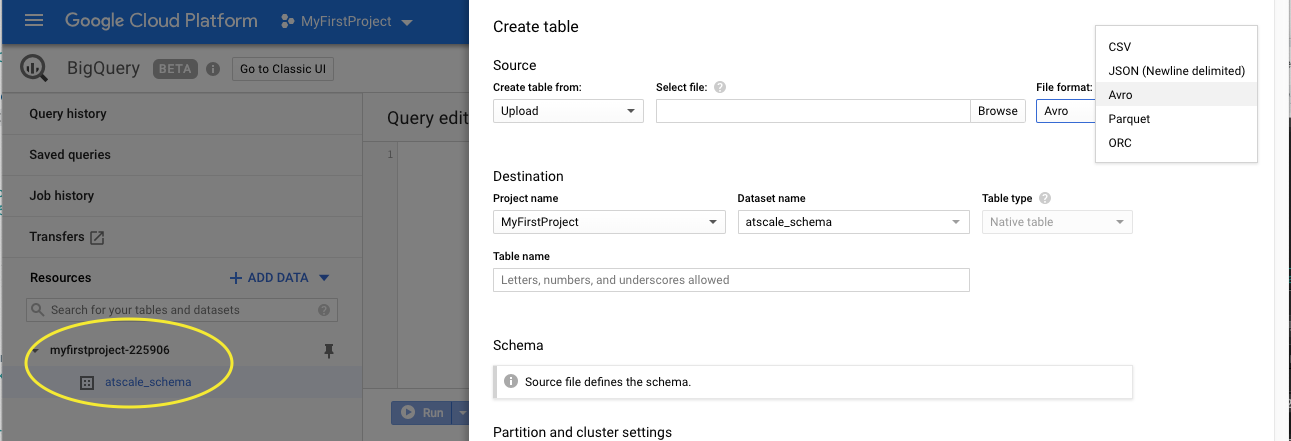
備忘録:Google BigQueryを使う前に設定すること

Ref: https://cloud.google.com/bigquery/docs/quickstarts/quickstart-web-ui
https://www.youtube.com/watch?v=qqbYrQGSibQ
https://codelabs.developers.google.com/codelabs/cloud-bigquery-wikipedia/#0

最初にクラウド側を設定

[ ENABLE THE API ]をクリックすると、プロジェクトを作れと言われる。
Google Cloud Platformコンソールから、New Projectを作ろうとすると

Google Cloud Platform service has been disabled. Please contact your administrator to restore service in G Suite Admin console.
https://stackoverflow.com/questions/45603145/unable-to-create-project-in-google-cloud-cloud-service-disabled-by-admin-plea
Check in your GSuite Admin console Apps -> Additional Google services if Google Developers Console is enabled:


データセット(スキーマ)を作る

https://cloud.google.com/bigquery/docs/quickstarts/quickstart-web-ui?hl=en_US&_ga=2.91297939.-865685195.1545114774#create_a_dataset

最初の時は、上のリンクから、OPEN THE SERVICE ACCOUNTS PAGEを開く。
Roleを変更するときは、IAMのページから。
BiqQuery AdminとStorage Adminが必要かも。

DataSetのロケーションは後から変更できない?

DataSet毎のパーミッションを設定するには(テーブル毎にはできない模様):
https://cloud.google.com/bigquery/docs/dataset-access-controls


ログイン用のJsonファイルを作る

めんどくさい。
https://cloud.google.com/iam/docs/creating-managing-service-accounts
https://www.magellanic-clouds.com/blocks/guide/create-gcp-service-account-key/

Google Cloud Bucketを作る

How-to: https://cloud.google.com/storage/docs/creating-buckets

ちなみに、ファイルのアップロードは


テーブルをファイルから作る場合は、スキーマを選んでから、Create Table


実際に使用すると下記のエラー。バケットにロケーションをRegionalに設定しているのが悪い?
com.google.cloud.bigquery.BigQueryException: Cannot read in location: asia-east1
        at com.google.cloud.bigquery.spi.v2.HttpBigQueryRpc.translate(HttpBigQueryRpc.java:102)
        at com.google.cloud.bigquery.spi.v2.HttpBigQueryRpc.getQueryResults(HttpBigQueryRpc.java:428)
        at com.google.cloud.bigquery.BigQueryImpl$23.call(BigQueryImpl.java:909)
        at com.google.cloud.bigquery.BigQueryImpl$23.call(BigQueryImpl.java:904)
        at com.google.api.gax.retrying.DirectRetryingExecutor.submit(DirectRetryingExecutor.java:105)
        at com.google.cloud.RetryHelper.run(RetryHelper.java:76)
        at com.google.cloud.RetryHelper.runWithRetries(RetryHelper.java:50)
        at com.google.cloud.bigquery.BigQueryImpl.getQueryResults(BigQueryImpl.java:903)
        at com.google.cloud.bigquery.BigQueryImpl.getQueryResults(BigQueryImpl.java:887)
        at com.google.cloud.bigquery.Job$1.call(Job.java:329)
        at com.google.cloud.bigquery.Job$1.call(Job.java:326)
        at com.google.api.gax.retrying.DirectRetryingExecutor.submit(DirectRetryingExecutor.java:105)
        at com.google.cloud.RetryHelper.run(RetryHelper.java:76)
        at com.google.cloud.RetryHelper.poll(RetryHelper.java:64)
        at com.google.cloud.bigquery.Job.waitForQueryResults(Job.java:325)
        at com.google.cloud.bigquery.Job.waitFor(Job.java:240)

https://issuetracker.google.com/issues/76127552#comment11
未だに、us-central1を使う必要あり?

TODO: Quotaを設定する

How-to: https://cloud.google.com/bigquery/docs/custom-quotas

クォータ管理画面を開く https://console.cloud.google.com/iam-admin/quotas
ServiceプルダウンからBigQuery APIを選択して、必要なLimitを変更。

"bq"コマンドをインストール

How-to: https://cloud.google.com/sdk/docs/

ダウンロード: https://dl.google.com/dl/cloudsdk/channels/rapid/downloads/google-cloud-sdk-260.0.0-darwin-x86_64.tar.gz
解凍したフォルダを適当な場所に移動しといたほうがいい。Downloadsとかに置いたままだと、そこがPATHに追加される。。。

コマンドリファレンス: https://cloud.google.com/bigquery/docs/reference/bq-cli-reference
クィックスタート: https://cloud.google.com/bigquery/docs/quickstarts/quickstart-command-line

ヘルプ例: "bq show --help" とか "bq ls --help | less"

テーブル一覧: bq ls --max_results=1000 --format=prettyjson project_id:dataset_name    # FriendlyNameはだめ

none:       ...
pretty:     formatted table output  
sparse:     simpler table output  
prettyjson: easy-to-read JSON format  
json:       maximally compact JSON  
csv:        csv format with header

Useful queries

https://cloud.google.com/bigquery/docs/information-schema-datasets
https://cloud.google.com/bigquery/docs/information-schema-tables

-- SHOW DATABASES
SELECT catalog_name, schema_name, location FROM INFORMATION_SCHEMA.SCHEMATA;

-- SHOW TABLES
SELECT * FROM <table_schema>.INFORMATION_SCHEMA.TABLES;


Java API

https://cloud.google.com/bigquery/docs/quickstarts/quickstart-client-libraries#client-libraries-install-java
https://cloud.google.com/bigquery/docs/tables

java -classpath ...  com.google.cloud.examples.bigquery.BigQueryExample


2018年11月16日金曜日

Docker (remote) API

Ref: https://docs.docker.com/develop/sdk/
Ref: https://docs.docker.com/develop/sdk/examples/

root@ubuntu:~# docker -v
Docker version 17.05.0-ce, build 89658be

Dockerのバージョンが17.05だと、APIバージョンは1.29?
Ref: https://docs.docker.com/engine/api/v1.29/


特定のコンテナのログを出力

https://docs.docker.com/engine/api/v1.29/#operation/ContainerLogs

curl --unix-socket /var/run/docker.sock "http:/v1.29/containers/21b9f7a811ee/logs?stdout=1"

コンテナリスト

curl -s -f --unix-socket /var/run/docker.sock http:/v1.29/containers/json | python -m json.tool

フィルターしたい

Ref: https://stackoverflow.com/questions/28054203/docker-remote-api-filter-exited

curl -s -f --unix-socket /var/run/docker.sock "http:/v1.29/containers/json" -G --data-urlencode 'all=1' --data-urlencode 'filters={"status":["running"]}' | python -m json.tool

ダブルクォートじゃないと500エラーになった。

2018年10月31日水曜日

HAProxy 備忘録

Check version and used config file

[root@node1 ~]# ps -elf | grep haproxy
4 S root     25713     1  0  80   0 - 11182 do_wai Oct30 ?        00:00:00 /usr/sbin/haproxy-systemd-wrapper -f /etc/haproxy/haproxy.cfg -p /run/haproxy.pid
0 S root     25714 25713  0  80   0 - 12730 do_wai Oct30 ?        00:00:00 /usr/sbin/haproxy -f /etc/haproxy/haproxy.cfg -p /run/haproxy.pid -Ds
1 S root     25715 25714  0  80   0 - 12730 ep_pol Oct30 ?        00:01:14 /usr/sbin/haproxy -f /etc/haproxy/haproxy.cfg -p /run/haproxy.pid -Ds

[root@node1 ~]# /usr/sbin/haproxy -v
HA-Proxy version 1.5.18 2016/05/10

Copyright 2000-2016 Willy Tarreau <willy@haproxy.org>


Enabling logging:
[root@node1 log]# vim /etc/rsyslog.conf
    ...
    $ModLoad imudp
    $UDPServerRun 514

[root@node1 log]# service rsyslog restart
Redirecting to /bin/systemctl restart rsyslog.service
[root@node1 log]# service haproxy restart

Redirecting to /bin/systemctl restart haproxy.service

How to interpret the health check log format, and log related config options

Refs:
https://cbonte.github.io/haproxy-dconv/1.5/configuration.html#8.2
https://cbonte.github.io/haproxy-dconv/1.7/configuration.html#8.2
https://www.haproxy.com/documentation/aloha/8-0/traffic-management/lb-layer7/health-checks/


Example config (part):
frontend postgres_tcp_front
  mode tcp
  bind *:<some port>
  option tcplog
  log global

  default_backend postgres_tcp_backend

backend postgres_tcp_backend
  option log-health-checks
  mode tcp
  option httpchk GET / HTTP/1.1
  http-check expect status 200

    server <server 1> <server 2>:5432 resolvers some_dns check inter 2000 rise 2 fall 3 port XXXX

tcplog = "TCP format, which is more advanced. This format is enabled when "option
    tcplog" is set on the frontend"
inter = interval
rize = "Number of consecutive valid health checks before considering the server as UP"
port = "TCP port where the TCP connection is established. If not set, uses the server's line port; if set, uses the port on the configured server"


Example log line:
[WARNING] 302/165834 (9050) : Health check for server postgres_tcp_backend/<server name> failed, reason: Layer7 wrong status, code: 503, info: "HTTP status check returned code <3C>503<3E>", check duration: 12ms, status: 0/2 DOWN.

302 = days since 1st Jan
165834 = hhmmss
(9050) = PID
0/2 DOWN = hasn't been down for past two times (coming from 'rise' and 'fail' keywords)


2018年10月10日水曜日

Scalaのコードまたはクラスをちょっとだけ変えてみる

上記と同様の手段で、Scalaも変えてみる。

Scalaをインストールする

function f_setup_scala() {
    local _ver="${1:-2.12.3}"
    local _extract_dir="${2:-/opt}}"
    local _inst_dir="${3:-/usr/local/scala}"

    if [ ! -d "${_extract_dir%/}/scala-${_ver}" ]; then
        if [ ! -s "${_extract_dir%/}/scala-${_ver}.tgz" ]; then
            curl --retry 3 -C - -o "${_extract_dir%/}/scala-${_ver}.tgz" "https://downloads.lightbend.com/scala/${_ver}/scala-${_ver}.tgz" || return $?
        fi
        tar -xf "${_extract_dir%/}/scala-${_ver}.tgz" -C "${_extract_dir%/}/" || return $?
        chmod a+x ${_extract_dir%/}/bin/*
    fi
    [ -d "${_inst_dir%/}" ] || ln -s "${_extract_dir%/}/scala-${_ver}" "${_inst_dir%/}"
    export SCALA_HOME=${_inst_dir%/}
    export PATH=$PATH:$SCALA_HOME/bin
}

書き換えたいクラスファイルを作成したあと、コンパイル

vim TestUtils.scala

export CLASSPATH=...(snip)...

scalac TestUtils.scala

CLASSPATHは走っているプロセスと同じのであれば、下記のファンクションが利用可

function f_javaenvs() {
    local _port="${1}"
    local _p=`lsof -ti:${_port}`
    if [ -z "${_p}" ]; then
        echo "Nothing running on port ${_port}"
        return 11
    fi
    local _user="`stat -c '%U' /proc/${_p}`"
    local _dir="$(dirname `readlink /proc/${_p}/exe` 2>/dev/null)"
    export JAVA_HOME="$(dirname $_dir)"
    export CLASSPATH=".:`sudo -u ${_user} $JAVA_HOME/bin/jcmd ${_p} VM.system_properties | sed -nr 's/^java.class.path=(.+$)/\1/p' | sed 's/[\]:/:/g'`"
}

差し替えたいJarファイルを見つける

function f_jargrep() {
    local _cmd="jar -tf"
    which jar &>/dev/null || _cmd="less"
    find -L ${2:-./} -type f -name '*.jar' -print0 | xargs -0 -n1 -I {} bash -c ''${_cmd}' {} | grep -w '$1' && echo {}'
}

バックアップを作成後(重要!)差し替える

$JAVA_HOME/bin/jar -uf /usr/local/test/lib/test.jar com/test/utils/TestUtils*.class

確認する

$JAVA_HOME/bin/jar -tvf /usr/local/test/lib/test.jar | grep TestUtils
$JAVA_HOME/bin/javap -cp /usr/local/test/lib/test.jar -private com.test.utils.TestUtils

2018年8月6日月曜日

FreeIPA with Ambari 2.7.0

Ambari 2.7.0からFreeIPAが正式サポート!


自作Dockerスクリプト用にFreeIPAインストールコマンドを作ってみました。
https://github.com/hajimeo/samples/blob/558d31e7f4030f18b34ede7738ec57fe4ad5b7a7/bash/setup_security.sh#L1154-L1181

LoopbackのIPv6を有効にしないと、インストールが成功せず、またD-busサービスを再起動しないとインストール内のコマンドがタイムアウトしてしまいました(Dockerのバグ?)


インストール後はこんな感じになります。

あとは、Ambariからいつも通りのウィザードでKerberos化します。
TODO:「A password policy is in place that sets no expiry for created principals」はよくやり方が解らなかったのでとりあえず10年にして見ました。
あと、Admin Principalにはadminとタイプ。

感想:
2、3日たったら動かなくなってしまった。KDCのデータベースファイルが見つからない模様。
再インストールして確認中。


参考:

https://github.com/apache/ambari/blob/6fce9b1ed5686814aa13454144e4b3ce89ad9b31/ambari-server/docs/security/kerberos/kerberos_service.md
Ambariからプリンシパルを作るところ(org.apache.ambari.server.serveraction.kerberos.IPAKerberosOperationHandler#createPrincipal)
https://github.com/apache/ambari/blob/6f223af4b1cfe73b57041453e998a70619c394d0/ambari-server/src/main/java/org/apache/ambari/server/serveraction/kerberos/IPAKerberosOperationHandler.java#L151
IPAコマンドを見つけるところ
https://github.com/apache/ambari/blob/6f223af4b1cfe73b57041453e998a70619c394d0/ambari-server/src/main/java/org/apache/ambari/server/serveraction/kerberos/IPAKerberosOperationHandler.java#L83


2018年3月6日火曜日

Solr (HDP Search) を6.6.2にアップグレード

アップグレードをテストするために古いバージョンをインストール

wget http://public-repo-1.hortonworks.com/HDP-SOLR/hdp-solr-ambari-mp/solr-service-mpack-2.2.8.tar.gz
ambari-server install-mpack --mpack=./solr-service-mpack-2.2.8.tar.gz
ambari-server restart
# Install Solr from Ambari Web UI normally

ブラウザーから、現在のコンフィグを取っておく(後で比較する)

アップグレード

ambari-server upgrade-mpack --mpack=./solr-service-mpack-3.0.0.tar.gz
ambari-server restart

新しいrepoファイルをダウンロード(追記:repoinfo.xmlが正しい場合は必要ないかも?)
curl -o /etc/yum.repos.d/hdp-solr.repo http://public-repo-1.hortonworks.com/HDP-SOLR-3.0.0-100/repos/centos6/hdp-solr.repo

ちなみに、下記ファイルは同じではないが、シムリンクでsolr-ambari-mpack-3.0.0以下にある
[root@sandbox-hdp HDP]# pwd
/var/lib/ambari-server/resources/stacks/HDP
[root@sandbox-hdp HDP]# grep -IRs 'HDP-SOLR' -l *
2.4/services/SOLR/repos/repoinfo.xml
2.5/repos/repoinfo.xml

2.6/services/SOLR/repos/repoinfo.xml
[root@sandbox-hdp HDP]# grep -IRs 'public-repo-1.hortonworks.com/HDP-SOLR-3.0.0-100' -l *

2.6/services/SOLR/repos/repoinfo.xml


mv /var/run/solr/solr-8983.pid /var/run/solr/solr-8983.pid.backup
# Delete Solr Service from Ambari web UI
mv /var/run/solr/solr-8983.pid.backup /var/run/solr/solr-8983.pid
/opt/lucidworks-hdpsearch/solr/bin/solr stop -all

# Metrics didn't exist (from 2.2.9)
#/opt/lucidworks-hdpsearch/metrics/bin/solr.metrics.sh stop
#bash: /opt/lucidworks-hdpsearch/metrics/bin/solr.metrics.sh: No such file or directory

mkdir /opt/lucidworks-hdpsearch-backup
cp -vR /opt/lucidworks-hdpsearch/* /opt/lucidworks-hdpsearch-backup/
yum upgrade lucidworks-hdpsearch -y

# Didn't work, ”Unrecognized or misplaced argument: cp!”
#/opt/lucidworks-hdpsearch/solr/bin/solr zk cp -z `hostname -f`:2181 -r zk:/solr/configs /tmp/solr/configs
/opt/lucidworks-hdpsearch/solr/bin/solr zk -z `hostname -f`:2181/solr -downconfig -n collection1 -d /tmp/solr/configs

[root@sandbox-hdp ~]# cd /tmp/solr/configs/conf/
[root@sandbox-hdp conf]# ls -ltr
total 148
-rw-r--r-- 1 root root   873 Mar  6 05:56 protwords.txt
-rw-r--r-- 1 root root  3974 Mar  6 05:56 currency.xml
-rw-r--r-- 1 root root 61978 Mar  6 05:56 solrconfig.xml
-rw-r--r-- 1 root root 55543 Mar  6 05:56 managed-schema
-rw-r--r-- 1 root root  1119 Mar  6 05:56 synonyms.txt
-rw-r--r-- 1 root root  1348 Mar  6 05:56 elevate.xml
-rw-r--r-- 1 root root   781 Mar  6 05:56 stopwords.txt
-rw-r--r-- 1 root root   308 Mar  6 05:56 params.json
drwxr-xr-x 2 root root  4096 Mar  6 05:56 lang

# Edit solrconfig.xml and upload
<luceneMatchVersion>6.6.2</luceneMatchVersion>

/opt/lucidworks-hdpsearch/solr/bin/solr zk -z `hostname -f`:2181/solr -upconfig -n collection1 -d /tmp/solr/configs

# Add Solr form Ambari web ui
# In the service selection screen, be sure the version displayed is 6.6.2
# After installing, review the config

# healthcheck
sudo -iu solr /opt/lucidworks-hdpsearch/solr/bin/solr healthcheck -c collection1 -z `hostname -f`:2181/solr
{
  "collection":"collection1",
  "status":"healthy",
  "numDocs":0,
  "numShards":2,
  "shards":[
    {
      "shard":"shard1",
      "status":"healthy",
      "replicas":[{
          "name":"core_node1",
          "url":"http://sandbox-hdp.hortonworks.com:8983/solr/collection1_shard1_replica1/",
          "numDocs":0,
          "status":"active",
          "uptime":"0 days, 0 hours, 12 minutes, 10 seconds",
          "memory":"142.6 MB (%29) of 492 MB",
          "leader":true}]},
    {
      "shard":"shard2",
      "status":"healthy",
      "replicas":[{
          "name":"core_node2",
          "url":"http://sandbox-hdp.hortonworks.com:8983/solr/collection1_shard2_replica1/",
          "numDocs":0,
          "status":"active",
          "uptime":"0 days, 0 hours, 12 minutes, 10 seconds",
          "memory":"142.6 MB (%29) of 492 MB",
          "leader":true}]}]}


補足:

curl -s -u admin:admin "http://`hostname -f`:8080/api/v1/stacks/HDP/versions/2.6/repository_versions/1?fields=operating_systems/repositories/Repositories/*" -o /tmp/repo_ver_1.json
grep -vw 'href' /tmp/repo_ver_1.json > /tmp/repo_ver_1.1.json
sed -i.bak 's/HDP-SOLR-2.6-100/HDP-SOLR-3.0.0-100/g' /tmp/repo_ver_1.1.json
curl -si -u admin:admin "http://`hostname -f`:8080/api/v1/stacks/HDP/versions/2.6/repository_versions/1" -X PUT -H 'X-Requested-By: ambari' -d @/tmp/repo_ver_1.1.json

多分必要ない?
#mv /etc/yum.repos.d/ambari-hdp-1.repo ./
#ambari-server restart --skip-database-check; ambari-agent restart

Ambari 2.6.0のLDAP Sync

[root@sandbox-hdp ~]# ambari-server sync-ldap --ldap-sync-admin-name=admin --ldap-sync-admin-password=admin --all --verbose
Using python  /usr/bin/python
Syncing with LDAP...
INFO: Loading properties from /etc/ambari-server/conf/ambari.properties
INFO: about to run command: ps -p 75967
INFO:
process_pid=54184
Syncing all.
Calling API http://127.0.0.1:8080/api/v1/ldap_sync_events : [{'Event': {'specs': [{'principal_type': 'users', 'sync_type': 'all'}, {'principal_type': 'groups', 'sync_type': 'all'}]}}]
..

Completed LDAP Sync.
Summary:
  memberships:
    removed = 0
    created = 0
  users:
    skipped = 1
    removed = 0
    updated = 0
    created = 0
  groups:
    updated = 0
    removed = 0
    created = 0

Ambari Server 'sync-ldap' completed successfully.


org.apache.ambari.server.api.services.LdapSyncEventService#createEvent

ambari-server.log
06 Mar 2018 03:43:36,214  INFO [pool-24-thread-1] AmbariLdapDataPopulator:736 - Reloading properties
06 Mar 2018 03:43:36,301  INFO [pool-24-thread-1] AmbariLdapDataPopulator:221 - User 'admin' skipped because it is local user

org.apache.ambari.server.controller.AmbariManagementControllerImpl#synchronizeLdapUsersAndGroups
org.apache.ambari.server.security.ldap.AmbariLdapDataPopulator#synchronizeAllLdapUsers
org.apache.ambari.server.security.ldap.AmbariLdapDataPopulator#getExternalLdapUserInfo
org.apache.ambari.server.security.ldap.AmbariLdapDataPopulator#getFilteredLdapUsers(java.lang.String, org.springframework.ldap.filter.Filter)

      LOG.trace("LDAP User Query - Base DN: '{}' ; Filter: '{}'", baseDn, encodedFilter);

      List dtos = configuration.getLdapServerProperties().isPaginationEnabled() ?
# authentication.ldap.pagination.enabled=false does matter?


Sandbox (HDP 2.6.3)でYarn Scheduler Load Simulator (SLS)を実行してみる

Ref: https://hadoop.apache.org/docs/r2.4.1/hadoop-sls/SchedulerLoadSimulator.html

su - yarn    # yarnになるのに特に理由なし
export HADOOP_ROOT=/home/yarn/hadoop

tar -xf /usr/hdp/2.6.3.0-235/hadoop/mapreduce.tar.gz
cat $HADOOP_ROOT/share/hadoop/tools/sls/sample-conf/sls-runner.xml   #Refと場所が違う
cp -r /etc/hadoop/conf/ $HADOOP_ROOT/etc/hadoop/
cp $HADOOP_ROOT/share/hadoop/tools/sls/sample-conf/sls-runner.xml $HADOOP_ROOT/etc/hadoop/sls-runner.xml
vim $HADOOP_ROOT/etc/hadoop/sls-runner.xml   # デフォルトでOK?

cd $HADOOP_ROOT/share/hadoop/tools/sls # or cd ./hadoop/share/hadoop/tools/sls
bash -x bin/slsrun.sh --input-rumen=sample-data/2jobs2min-rumen-jh.json --output-dir=sample-output


TODO: NPEがでる

18/03/06 00:49:43 INFO capacity.CapacityScheduler: Added node a2116.smile.com:3 clusterResource: <memory:40960, vCores:40>
Exception in thread "main" java.lang.RuntimeException: java.lang.NullPointerException
        at org.apache.hadoop.util.ReflectionUtils.newInstance(ReflectionUtils.java:134)
        at org.apache.hadoop.yarn.sls.SLSRunner.startAMFromRumenTraces(SLSRunner.java:398)
        at org.apache.hadoop.yarn.sls.SLSRunner.startAM(SLSRunner.java:250)
        at org.apache.hadoop.yarn.sls.SLSRunner.start(SLSRunner.java:145)
        at org.apache.hadoop.yarn.sls.SLSRunner.main(SLSRunner.java:528)
Caused by: java.lang.NullPointerException
        at java.util.concurrent.ConcurrentHashMap.get(ConcurrentHashMap.java:936)
        at org.apache.hadoop.util.ReflectionUtils.newInstance(ReflectionUtils.java:126)
        ... 4 more


http://sandbox-hdp.hortonworks.com:10001/simulate

java.lang.NullPointerException
        at org.apache.hadoop.yarn.sls.web.SLSWebApp.printPageSimulate(SLSWebApp.java:219)
        at org.apache.hadoop.yarn.sls.web.SLSWebApp.access$100(SLSWebApp.java:54)
        at org.apache.hadoop.yarn.sls.web.SLSWebApp$1.handle(SLSWebApp.java:131)
        at org.mortbay.jetty.handler.HandlerWrapper.handle(HandlerWrapper.java:152)
        at org.mortbay.jetty.Server.handle(Server.java:326)
        at org.mortbay.jetty.HttpConnection.handleRequest(HttpConnection.java:542)
        at org.mortbay.jetty.HttpConnection$RequestHandler.headerComplete(HttpConnection.java:928)
        at org.mortbay.jetty.HttpParser.parseNext(HttpParser.java:549)
        at org.mortbay.jetty.HttpParser.parseAvailable(HttpParser.java:212)
        at org.mortbay.jetty.HttpConnection.handle(HttpConnection.java:404)
        at org.mortbay.jetty.bio.SocketConnector$Connection.run(SocketConnector.java:228)
        at org.mortbay.thread.QueuedThreadPool$PoolThread.run(QueuedThreadPool.java:582)

2018年2月6日火曜日

hive --version

[root@sandbox-hdp ~]# export CLASSPATH='/usr/hdp/2.6.3.0-235/hadoop/conf:/usr/hdp/2.6.3.0-235/hadoop/lib/*:/usr/hdp/2.6.3.0-235/hadoop/.//*:/usr/hdp/2.6.3.0-235/hadoop-hdfs/./:/usr/hdp/2.6.3.0-235/hadoop-hdfs/lib/*:/usr/hdp/2.6.3.0-235/hadoop-hdfs/.//*:/usr/hdp/2.6.3.0-235/hadoop-yarn/lib/*:/usr/hdp/2.6.3.0-235/hadoop-yarn/.//*:/usr/hdp/2.6.3.0-235/hadoop-mapreduce/lib/*:/usr/hdp/2.6.3.0-235/hadoop-mapreduce/.//*::jdbc-mysql.jar:mysql-connector-java-5.1.17.jar:mysql-connector-java-5.1.37.jar:mysql-connector-java.jar:/usr/hdp/2.6.3.0-235/tez/*:/usr/hdp/2.6.3.0-235/tez/lib/*:/usr/hdp/2.6.3.0-235/tez/conf'
[root@sandbox-hdp ~]# /usr/lib/jvm/java/bin/java -Xmx250m -Dhdp.version= -Djava.net.preferIPv4Stack=true -Dhadoop.log.dir=/var/log/hadoop/root -Dhadoop.log.file=hadoop.log -Dhadoop.home.dir=/usr/hdp/2.6.3.0-235/hadoop -Dhadoop.id.str=root -Dhadoop.root.logger=INFO,console -Djava.library.path=:/lib/native/Linux-amd64-64:/usr/hdp/2.6.3.0-235/hadoop/lib/native -Dhadoop.policy.file=hadoop-policy.xml -Djava.net.preferIPv4Stack=true -Xmx250m -Dhadoop.security.logger=INFO,NullAppender org.apache.hadoop.util.RunJar /usr/hdp/2.6.3.0-235/hive/lib/hive-exec-1.2.1000.2.6.3.0-235.jar org.apache.hive.common.util.HiveVersionInfo
Hive 1.2.1000.2.6.3.0-235
Subversion git://ctr-e134-1499953498516-254436-01-000004.hwx.site/grid/0/jenkins/workspace/HDP-parallel-centos6/SOURCES/hive -r 5f360bda08bb5489fbb3189b5aeaaf58029ed4b5
Compiled by jenkins on Mon Oct 30 02:48:31 UTC 2017
From source with checksum 94298cc1f5f5bf0f3470f3ea2e92d646

[root@sandbox-hdp ~]# zipgrep '1.2.1000.2.6.3.0-235' /usr/hdp/2.6.3.0-235/hive/lib/hive-exec-1.2.1000.2.6.3.0-235.jar
META-INF/MANIFEST.MF:Specification-Version: 1.2.1000.2.6.3.0-235
META-INF/MANIFEST.MF:Implementation-Version: 1.2.1000.2.6.3.0-235
META-INF/DEPENDENCIES:  - Hive Ant Utilities (http://hive.apache.org/hive-ant) org.apache.hive:hive-ant:jar:1.2.1000.2.6.3.0-235
META-INF/DEPENDENCIES:  - Hive...
org/apache/hive/common/package-info.class:Binary file (standard input) matches
...

HiveVersionInfo.java
public class HiveVersionInfo {
  private static final Log LOG = LogFactory.getLog(HiveVersionInfo.class);

  private static Package myPackage;
  private static HiveVersionAnnotation version;

  static {
    myPackage = HiveVersionAnnotation.class.getPackage();
    version = myPackage.getAnnotation(HiveVersionAnnotation.class);
  }

https://docs.oracle.com/javase/7/docs/api/java/lang/Package.html
Package objects contain version information about the implementation and specification of a Java package. This versioning information is retrieved and made available by the ClassLoader instance that loaded the class(es). Typically, it is stored in the manifest that is distributed with the classes.

https://docs.oracle.com/javase/tutorial/deployment/jar/packageman.html

strace...
[pid 13244] read(372, "\312\376\272\276\0\0\0004\0\31\1\0#org/apache/hive/common/package-info\7\0\1\1\0\20java/lang/Object\7\0\3\1\0\21package-info.java\1\0.Lorg/apache/hive/common/HiveVersionAnnotation;\1\0\7version\1\0\0212.1.0.2.6.3.0-235\1\0\fshortVersion\1\0\0102.1.2000\1\0\10revision\1\0(a193ce8bbba5814dd743592a854aa0bc26e6809f\1\0\6branch\1\0\32(HEAD detached at a193ce8)\1\0\4user\1\0\7jenkins\1\0\4date\1\0\34Mon Oct 30 02:48:10 UTC 2017\1\0\3url\1\0rgit://ctr-e134-1499953498516-254436-01-000013.hwx.site/grid/0/jenkins/workspace/HDP-parallel-centos6/SOURCES/hive2\1\0\vsrcChecksum\1\0 eb20828b2f4543b30d85a59e81f61782\1\0\nSourceFile\1\0\31RuntimeVisibleAnnotations\26\0\0\2\0\4\0\0\0\0\0\0\0\2\0\27\0\0\0\2\0\5\0\30\0\0\0.\0\1\0\6\0\10\0\7s\0\10\0\ts\0\n\0\vs\0\f\0\rs\0\16\0\17s\0\20\0\21s\0\22\0\23s\0\24\0\25s\0\26", 632) = 632
[pid 13244] write(1, "Hive 2.1.0.2.6.3.0-235", 22 <unfinished ...>
Hive 2.1.0.2.6.3.0-235[pid 13259] <... futex resumed> )       = -1 EAGAIN (Resource temporarily unavailable)

hive/common/src/scripts/saveVersion.sh
...
cat << EOF | \
  sed -e "s/VERSION/$version/" -e "s/SHORTVERSION/$shortversion/" \
      -e "s/USER/$user/" -e "s/DATE/$date/" \
      -e "s|URL|$url|" -e "s/REV/$revision/" \
      -e "s|BRANCH|$branch|" -e "s/SRCCHECKSUM/$srcChecksum/" \
      > $src_dir/gen/org/apache/hive/common/package-info.java
/*
 * Generated by saveVersion.sh
 */
@HiveVersionAnnotation(version="VERSION", shortVersion="SHORTVERSION",
                         revision="REV", branch="BRANCH",
                         user="USER", date="DATE", url="URL",
                         srcChecksum="SRCCHECKSUM")
package org.apache.hive.common;
EOF

2017年12月29日金曜日

Kerberos済みのHDPで、Ranger Solr PluginのAudit先をAmbari Infraにする (Unofficial)

前提条件:

SolrとRanger Solr Pluginをインストール 
mPackは2.2.9、HDPは2.6.2かそれ以降を推奨(RANGER-1446, RANGER-1658)
Ambari InfraにHDFSのAuditが正常に書き込まれているのを確認


1) NameNodeのサーバーから/etc/hadoop/conf/ranger-hdfs-audit.xmlをSolrサーバの下記ファイルにコピー
/opt/lucidworks-hdpsearch/solr/server/solr-webapp/webapp/WEB-INF/classes/ranger-solr-audit.xml 

2) ranger-solr-audit.xmlを編集後、SolrをAmbariからリスタート 

xasecure.audit.destination.solr.batch.filespool.dir = /var/log/solr/audit/solr/spool 
xasecure.audit.jaas.Client.option.keyTab = /etc/security/keytabs/solr.service.keytab 
xasecure.audit.jaas.Client.option.principal = solr/_HOST@YOUR_PRINCIPAL 
xasecure.audit.solr.solr_url = (empty value) 

3) /var/lib/ambari-agent/cache/common-services/RANGER/0.4.0/package/scripts/setup_ranger_xml.py を編集(太字の部分を追加):

service_default_principals_map = [('hdfs', 'nn'), ('hbase', 'hbase'), ('hive', 'hive'), ('kafka', 'kafka'), ('kms', 'rangerkms'), 
('knox', 'knox'), ('nifi', 'nifi'), ('storm', 'storm'), ('yanr', 'yarn'), ('solr', 'solr')]

Ambari Agentのキャッシュを変更しているので、Ambari Server側のファイルも変更する必要あり。
.pyc、.pyoファイルがあった場合は削除。 

4) Ranger AdminをAmbariから再起動(する事によって上記ユーザがSolr Roleに追加され、403エラーが発生しなくなる)

Ambari 2.6.0は日本語Localeだともしかしたら動かない場合あり

Ambari 2.6.0からyumrpm.pyが大幅に変わりました。
サービスのインストールやスタート時に、yum list availableとyum list installedを実行する模様です。
その際、標準と異なるアウトプットが出るとサービスのインストールやスタートに失敗する可能性があります。
「標準と異なるアウトプット」とはRedhat Satelliteやyum pluginなどを使っていると、yum list xxxxコマンド実行時に、リストの最初と最後に数行エクストラな情報がでます。
Satelliteに関してはAmbari2.6.2で修正される模様です。

で、問題(になる可能性)は下記のラインのように英語の出力を想定している部分があることです。

    return self._lookup_packages(cmd, 'Available Packages')

日本語環境にしているとyumの出力も日本語になります。したがって、上記の単語にマッチしないわけですが、その場合は_lookup_packages()内で最初の三行を無視するようになっているので、うまくいく場合といかない場合がでてきます。

簡単な回避策としては、/var/lib/ambari-agent/bin/ambari-agentに"export LANG=C"を追加するなどがあります。


備考:

[root@sandbox-hdp ~]# cat /etc/sysconfig/i18n
LANG="en_US.UTF-8"
SYSFONT="latarcyrheb-sun16"

日本語にして見ます。
[root@sandbox-hdp ~]# cat /etc/sysconfig/i18n
LANG="ja_JP.utf8"
SYSFONT="latarcyrheb-sun16"

ログアウト・ログイン後、または
[root@sandbox-hdp ~]# . /etc/sysconfig/i18n
[root@sandbox-hdp ~]# locale
LANG=ja_JP.utf8
LC_CTYPE="ja_JP.utf8"
LC_NUMERIC="ja_JP.utf8"
LC_TIME="ja_JP.utf8"
LC_COLLATE="ja_JP.utf8"
LC_MONETARY="ja_JP.utf8"
LC_MESSAGES="ja_JP.utf8"
LC_PAPER="ja_JP.utf8"
LC_NAME="ja_JP.utf8"
LC_ADDRESS="ja_JP.utf8"
LC_TELEPHONE="ja_JP.utf8"
LC_MEASUREMENT="ja_JP.utf8"
LC_IDENTIFICATION="ja_JP.utf8"
LC_ALL=

TODO: CentOS7の場合は"localectl set-locale LANG=ja_JP.utf8;export LC_CTYPE=ja_JP.UTF-8"?

[root@sandbox-hdp ~]# yum list installed | head
読み込んだプラグイン:fastestmirror, ovl, priorities
インストール済みパッケージ
ConsoleKit.x86_64                       0.4.1-6.el6              @base
ConsoleKit-libs.x86_64                  0.4.1-6.el6              @base
GConf2.x86_64                           2.28.0-7.el6             @base
MAKEDEV.x86_64                          3.24-6.el6               @CentOS/6.8
ORBit2.x86_64                           2.14.17-6.el6_8          @base
PyQt4.x86_64                            4.6.2-9.el6              @base
R.x86_64                                3.4.1-1.el6              @epel
R-core.x86_64                           3.4.1-1.el6              @epel

TODO: もしかしたらワークアラウンド?(どのような影響がでるか不明)
repositories.legacy-override.enabled=true